
My Mitsubishi Connect
Mitsubishi Motors CorporationAuto & Vehicles
4.71.48K Reviews
- Version
- v2.90.10
- Installs
- 100.00K
- Age Rating
- Everyone
Screenshots
Our Review of My Mitsubishi Connect
 Analysis by Appyee
My Mitsubishi Connect is the kind of car app I only appreciate after it becomes part of a routine. It is not trying to replace every driving tool on a phone; its purpose is narrower and more useful for the right owner: registering and accessing connected services for a Mitsubishi vehicle. I found that focus helpful because the app feels tied to the ownership experience rather than padded with unrelated travel or entertainment features.
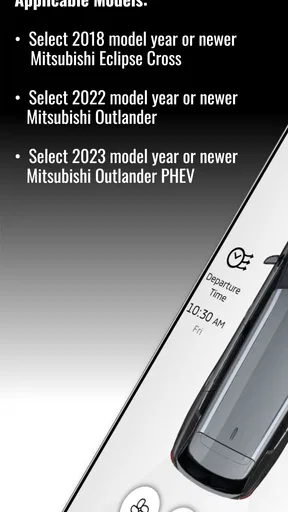
Developed by Mitsubishi Motors Corporation, it sits in the Auto & Vehicles category and is free to install. The app is rated for Everyone, which makes its presentation broadly approachable, although the practical value still depends on owning a compatible Mitsubishi vehicle and being able to complete the connection and registration process. That distinction matters: this is not a general-purpose car companion that makes sense for every driver.
With a 4.7 average from around 18 thousand ratings and over 100 thousand installs, it has clearly attracted a substantial group of users. I would not treat those figures as a guarantee that every setup will be effortless, but they do suggest that the app is being used beyond a small test audience. My overall impression is positive, especially for drivers who want vehicle-related services in one place, though the experience is more dependent on the car and account setup than a normal standalone app.
Using the app when attention, vision, or movement varies
I’d treat accessibility as part of the setup, not something to troubleshoot while heading out. I’d first adjust the phone’s text size, contrast, and touch settings, then try the registration steps at a calm pace and note any point that feels difficult. That makes it easier to distinguish a phone-interface issue from a vehicle or account question, which is useful context when deciding what routine will work best.
Readability starts with knowing what the app is for
The clearest strength is the limited scope. When I open a vehicle-connectivity app, I do not want to sort through a long list of generic automotive articles before reaching the ownership tools. My Mitsubishi Connect presents itself as a gateway to connected services, so the basic mental model is easy: register the vehicle, access the available services, and return to the app when I need them.
That simplicity can be particularly useful for someone who finds crowded interfaces tiring. A driver managing fatigue, reduced concentration, or unfamiliarity with automotive technology benefits from an app that does not ask them to learn an entire ecosystem before getting started. The important information is connected to the Mitsubishi relationship, rather than being buried among unrelated functions.
Still, simple purpose does not automatically mean simple setup. Registration can involve several pieces of information and decisions, and that is where a user may need more patience than the short store description suggests. I recommend doing the first setup while parked, with the vehicle documents and account details nearby. Trying to register while rushing out of a car park is a poor test of any connected-car app, particularly for users who need extra time to read prompts or check each entry carefully.
For readability, I would also judge the app in the context of the phone itself. Text size, screen contrast, display zoom, and operating-system accessibility settings can make a significant difference. Someone with low vision should adjust those settings before beginning registration and should avoid relying on a quick glance at the screen while moving around the vehicle. The app can support a calmer workflow, but it cannot remove the need to read account and vehicle information accurately.
Navigation is most useful when it follows ownership tasks
I like the idea of returning to one recognizable place for connected vehicle services instead of searching through email, a browser, and separate notes. That is a practical advantage over the usual alternative of managing everything manually. A browser can work for account access, but a dedicated app is easier to find and reopen when the vehicle is part of a daily routine.
The trade-off is that an app designed around connected services may feel less familiar to someone expecting a full driving dashboard. It is not the same thing as a navigation app, a roadside directory, or a general maintenance log. If your main need is route planning or traffic information, a dedicated mapping tool will usually be the better choice. My Mitsubishi Connect makes more sense as the ownership-access layer alongside those tools.
One useful habit is to separate “registration day” from “regular use.” On registration day, I would work slowly, confirm the vehicle details, and make sure the account is connected before assuming the service is ready. On later days, I would use the app only for the connected functions I actually need. This two-stage approach reduces the chance that a user with memory difficulties or limited attention has to repeat the entire setup process mentally every time.
Motor and sensory considerations in everyday use
The app’s value is not limited to people who want convenience. Connected vehicle access can be meaningful for drivers or passengers whose movement, stamina, or dexterity varies. A person who finds repeated trips between the vehicle and the house difficult may prefer checking the relevant service from the phone first. Someone recovering from an injury may also appreciate reducing unnecessary physical steps around the car, provided the vehicle and account support the needed service.
I want to be careful here: the app should not be treated as a substitute for safe vehicle checks. A phone screen cannot tell a user everything that a direct inspection can reveal, and no connected function removes the need to follow the vehicle’s instructions. The benefit is mainly organizational and situational. It can put vehicle-related access in a familiar device, which may be easier to handle than paper instructions or a less frequently used web account.
For users with tremors, limited fine-motor control, or difficulty holding a phone steady, the first registration can be the most demanding part. Typing account details, selecting options, and responding to prompts may require precise taps. A practical workaround is to use a stable surface, enable the phone’s built-in touch and text settings, and complete the process when there is no time pressure. Voice input may help with text entry on the phone, but I would still review every field because vehicle and account details need to be correct.
For users with hearing loss, a visual interface is preferable to a process that depends only on spoken instructions. At the same time, I would not assume that every alert or confirmation is equally clear without checking the screen. Keep the phone’s visual notification settings comfortable, and confirm important actions in the app rather than relying on a sound or vibration alone. For users with photosensitivity or sensory overload, a quiet setup environment and reduced notification clutter can make the experience less exhausting.
Situational access matters more than convenience claims
The strongest everyday use case I can imagine is arriving home after a tiring day and wanting to deal with a vehicle-related task without searching for a paper manual or remembering a sequence of web pages. The app gives that task a consistent home on the phone. Another realistic situation is sharing responsibility for a Mitsubishi vehicle within a household: one person can handle the account setup, while another uses the established access later. In that situation, agree on who manages account details and avoid passing passwords around casually.
A different example is a driver who needs to plan around limited energy. They can prepare the connected-service side of a trip before leaving, rather than standing beside the vehicle trying to solve registration questions. That does not make the journey risk-free, but it shifts the administrative work to a better moment. I consider this a more meaningful accessibility benefit than simply calling the app convenient.
There is also a useful distinction between being near the vehicle and being away from it. A connected-service app is most valuable when it lets the owner handle an appropriate task without physically interacting with the car at that exact moment. However, the user should understand which actions require the vehicle to be available, connected, or in a particular state. If an important result is not visible, I would not keep repeating taps; I would check the vehicle’s status and account setup first.
People who drive in areas with weak mobile coverage should plan conservatively. A connected service depends on communication between the phone, the account, and the vehicle, so I would not make a time-sensitive decision based solely on an assumption that the app will respond immediately. This is one reason I see it as a support tool rather than the only way to manage an urgent situation.
Where the experience still creates barriers
The biggest barrier is eligibility and dependence on the Mitsubishi ownership setup. A person may download the app easily but gain little from it without the right vehicle relationship and registration path. That makes it a poor recommendation for someone shopping across several brands, borrowing cars regularly, or looking for a universal vehicle-management tool.
Account recovery and registration are another potential friction point. Users who have difficulty remembering passwords, reading small verification text, or switching between messages and the app may find the initial process tiring. I would prepare a secure password manager or another safe method of retrieving credentials before starting. I would not write passwords on a loose note inside the car, since convenience should not create a security problem.
Shared vehicles can introduce additional confusion. If several people use the same Mitsubishi, decide in advance whose account is the primary one and how other drivers should access the service. A person with cognitive disabilities may benefit from a short, written routine using plain language: open the app, check the vehicle entry, complete the intended task, and close it. Keeping that routine separate from sensitive login information makes it easier to follow without exposing account details.
The app also cannot solve every physical or sensory barrier around the vehicle itself. A phone-based service may reduce some unnecessary walking or searching, but it does not change the height of a screen, the reach required to access a car, the effort of loading mobility equipment, or the need to inspect the vehicle safely. Users should judge it as one part of an accessible driving routine, not as a complete accessibility system.
Finally, the experience may be less satisfying for people who want extensive customization or a single app for every transport need. The normal alternative of using the vehicle’s own controls can be more direct for someone who is already in the driver’s seat. A browser may be preferable on a large screen for users who struggle with phone-sized text. Conversely, the dedicated app is more convenient when the phone is the device a person already carries and understands.
Version, compatibility, and the practical decision
The current release is v2.90.10, and the app supports devices running Android 6.0 or later. That makes it relevant to people who keep an older Android phone, although an older operating system can still affect the broader phone experience through display settings, security support, or performance. Before relying on the app for regular vehicle access, I would install it on the phone that will actually be carried during trips, rather than assuming a spare device will behave the same way.
Because this is a free app, the financial barrier is low. The more important question is whether it fits the person’s vehicle, account, and daily habits. The Everyone age rating is reassuring for general presentation, but it should not be confused with a promise that every user will find registration effortless. A teenager, an older adult, or a family member assisting the owner may all need different levels of support during setup.
I would recommend it most strongly to a Mitsubishi owner who wants a dedicated place for connected services, prefers using a phone over a browser, and is willing to complete the initial registration carefully. I would be more cautious for someone who needs a universal app, has no compatible Mitsubishi ownership connection, or expects the app to replace navigation, emergency support, physical vehicle checks, and every other automotive tool.
My inclusive verdict
After looking at it through the lens of different abilities and real situations, I see My Mitsubishi Connect as a focused ownership companion rather than a complete accessibility solution. Its best quality is that it gives Mitsubishi connected services a consistent home, which can reduce searching, memory load, and unnecessary trips between information sources. That matters when a person is tired, managing limited mobility, or simply wants a predictable routine.
Its weaknesses are equally practical. The first setup may require careful reading, account management, and accurate vehicle information. The app remains dependent on the vehicle and connection context, and it cannot remove physical barriers around the car. Users who need a large-screen workflow, a universal automotive dashboard, or a tool that works independently of Mitsubishi should look elsewhere or use it alongside a more suitable alternative.
For the right owner, I would recommend installing it before an urgent need arises, completing registration while parked, adjusting the phone’s display and touch settings, and creating a simple personal routine for regular access. Those small preparations make the experience more inclusive than treating the app as something to figure out in a hurry.
My final view is favorable but specific: My Mitsubishi Connect is most useful when predictable access to Mitsubishi connected services is the goal. It earns its place on my phone because it supports that narrow task without pretending to be every automotive app at once. If that matches your vehicle and your way of managing daily travel, the free download is easy to justify; if it does not, the app’s polished ownership focus will not compensate for the mismatch.
Verdict
Strengths of My Mitsubishi Connect
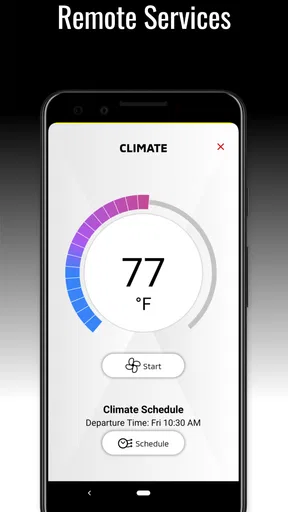
- Remote start and climate control can make the car comfortable before you enter.
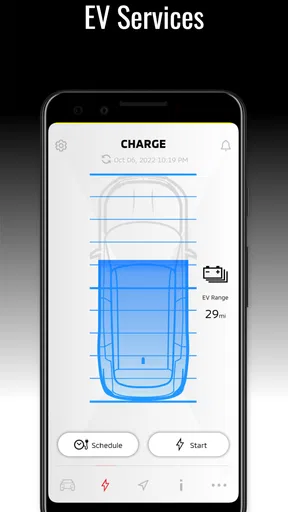
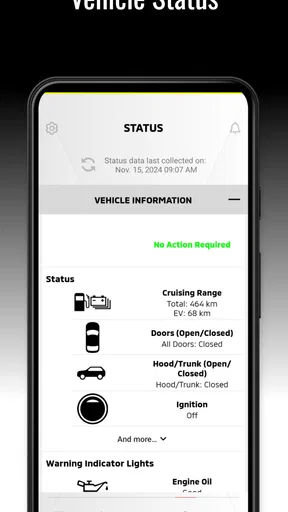
- Vehicle status checks help confirm fuel level, doors, lights, and charging state.
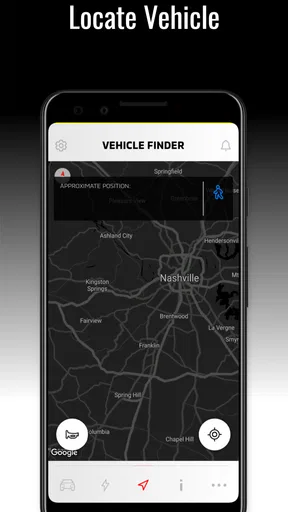
- Find-my-car features make it easier to locate your Mitsubishi in busy areas.
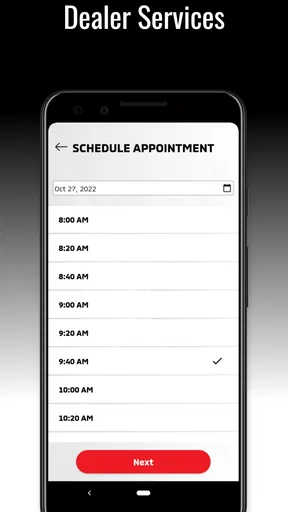
- Maintenance reminders can help owners keep track of scheduled service needs.
- Some models support roadside assistance access directly from the app.
Limitations of My Mitsubishi Connect
- Available features depend heavily on the Mitsubishi model, trim, and region.
- Remote commands may fail when the vehicle or phone has a weak connection.
- The app can drain battery through notifications and background location services.
- Some users may need a paid subscription after the included trial period ends.
- Initial pairing and account verification can be confusing for first-time users.
Similar Picks in This Category
View All
Android Auto
Google LLC4.1

maxim — order a taxi & food
PT. SITO4.7

Штрафы ГИБДД: проверка с фото
Pays LLC – Штрафы ГИБДД4.7

Номерограм – проверка авто
Авто Ассист4.8

Дром Авто
Дром4.9

Frequently Asked Questions
What is My Mitsubishi Connect, and what can I do with it?
My Mitsubishi Connect is Mitsubishi Motors’ connected-vehicle app for compatible models and equipped trims. After pairing your vehicle and activating an eligible subscription, it can provide features such as remote locking or unlocking, vehicle status information, location assistance, roadside support, and other connected services. The exact tools available depend on your vehicle, model year, country, mobile signal, and subscription plan.
Which Mitsubishi vehicles and devices are compatible with My Mitsubishi Connect?
Compatibility is not universal across the Mitsubishi range. My Mitsubishi Connect generally works only with selected Mitsubishi vehicles equipped with the required connected-services hardware and sold in supported markets. Before downloading, check Mitsubishi’s official compatibility list or enter your vehicle details during setup. The app typically requires a recent Android or iPhone version, an internet connection, and permission to use notifications, location, and other functions needed for connected services.
Does My Mitsubishi Connect require a subscription or additional fees?
Some connected features may be included with a complimentary trial, while continued access can require a paid subscription after the trial ends. Pricing, included functions, renewal terms, and availability vary by vehicle, dealership, country, and service package. Downloading the app itself may be free, but users should review the current Mitsubishi terms before activating the service, especially if remote commands or safety assistance are important to them.
How reliable are the remote controls and vehicle information in the app?
Remote commands and vehicle data depend on the car’s built-in communication system, mobile network coverage, battery condition, server availability, and the quality of your phone’s internet connection. Commands may take time to complete or fail in areas with weak reception. The app is useful for convenience, but it should not replace physically checking that the vehicle is secure or relying on it for urgent safety-critical situations.
What should I do if My Mitsubishi Connect will not pair or stops working?
Start by confirming that your vehicle is compatible, your subscription is active, and you are signed in with the account connected to the vehicle. Update the app and your phone’s operating system, enable the requested permissions, and verify mobile data or Wi-Fi access. Restarting the app or phone may help. If pairing still fails, contact your Mitsubishi dealer or official customer support because vehicle enrollment may require account or hardware assistance.
